The problem

Every rented GPU starts from zero.

You rent the machine by the hour — then spend the first hours making it feel like yours again. Three ways the same evening goes wrong.

The first hours

Rebuilding it by hand, again.

Fresh machine, empty disk. pip resolves a different set of versions than it did last week, the custom nodes have moved on, and every model downloads again.

The meter runs long before the first render does.

The next card

“Works on my pod” isn’t a promise.

A different card, a newer GPU generation — and the setup that ran last night stops with an error nobody can explain, on the morning it was due.

You can’t promise a delivery when you can’t promise your own environment.

The monthly bill

A network volume stays where it is.

It lives in one region, on one provider. It can’t follow you to a cheaper card somewhere else, and it can’t be handed to anyone.

It bills every night, including the nights nothing runs.

So we built the opposite Not a bigger freezer — a way to rebuild, and check. ↓

The method

We don’t freeze machines. We rebuild them.

A nest isn’t a disk image. It’s the recipe of a run that already worked — the files, the locked dependencies and the workflow — captured once, kept in your drive, and rebuilt on whatever you rent next.

What we promise is the files and dependencies coming back, each one checked. Whether it then runs is something we test on every restore and report back — not something we assume.

  1. Step 01 · Capture

    Take the recipe off the machine that works.

    On the machine where a ComfyUI run — or a kohya_ss / LLaMA-Factory fine-tune — already works, one command (or one button in the ComfyUI panel) records the models, the custom nodes, the locked dependencies and the workflow. Every file is recorded by its own content on the way in, so “roughly the same” can’t sneak aboard.

  2. Step 02 · Store

    It waits in storage, not on a machine.

    The nest lands in your drive, filed by content instead of by filename. A file that is already stored is never stored twice, and only files the drive hasn’t seen travel. Nothing runs, so nothing bills by the hour.

  3. Step 03 · Check

    Judge the machine before you spend time on it.

    Before anything downloads, the restore checks the machine you just rented against what the nest was packed on. A pairing that cannot work — say, a GPU generation the packed code was never built for — is refused up front, not twenty minutes into a dependency install.

    free diskGPU driverGPU generationsystem libraries the nest needs

  4. Step 04 · Restore

    Rebuild by the recipe, check every file, run it once.

    One command on the new machine. It walks these stages in order and tells you which one stopped, if one does:

    • checking this machine
    • downloading
    • putting files in place
    • installing dependencies
    • starting up
    • test render

    Every file is checked against its fingerprint as it lands. Then the app starts and your workflow runs once — and at the end it prints where the output is and how to open the app yourself. Lost the machine halfway? The same command works on another one.

Open format · Apache-2.0

All of it lands in an open format. Every nest ships a plain restore.sh that brings back its files and dependencies with zero Renest code — so your work never depends on us still being here. the escape hatch

Why it holds

What you can count on.

Files

Files are guaranteed. Images are honest.

Every file is checked byte for byte on the way in — that part we guarantee. Images depend on the hardware: the same GPU model and CPU brand give the same image back; other hardware gives small differences, the same ones every time.

A different card

A recipe, not a frozen disk.

Dependencies are installed again on the machine you land on, at the versions you packed, so a nest isn’t tied to one machine. The pre-check refuses a card the packed code can’t run on, before anything downloads.

Resilience

Cut off halfway? It picks up where it stopped.

Uploads and downloads resume instead of starting over, and a file that fails its check is fetched again on its own.

Changing the card

Same GPU generation: the dependencies go back on.

A nest is a recipe, not a frozen disk. The dependencies are installed again, at the versions you packed, on the machine you land on — nothing is swapped for a newer card. So before anything downloads, the pre-flight check compares the machine with the card that packed the nest and refuses one the packed code can't run on, such as a card a generation newer than the capture.

Want the exact same image back? Use the same GPU model and the same CPU brand. Other hardware gives small differences — the same ones every time.


Same GPU model · same CPU brand Identicalthe same image file

Restored on the same GPU model and CPU brand, the render comes back as the same file — the difference map is completely black.

The original render
original
The same render after a restore — the same file
restored
The difference map is completely black
difference
Different CPU brand Near-identicalthe same tiny difference, every time

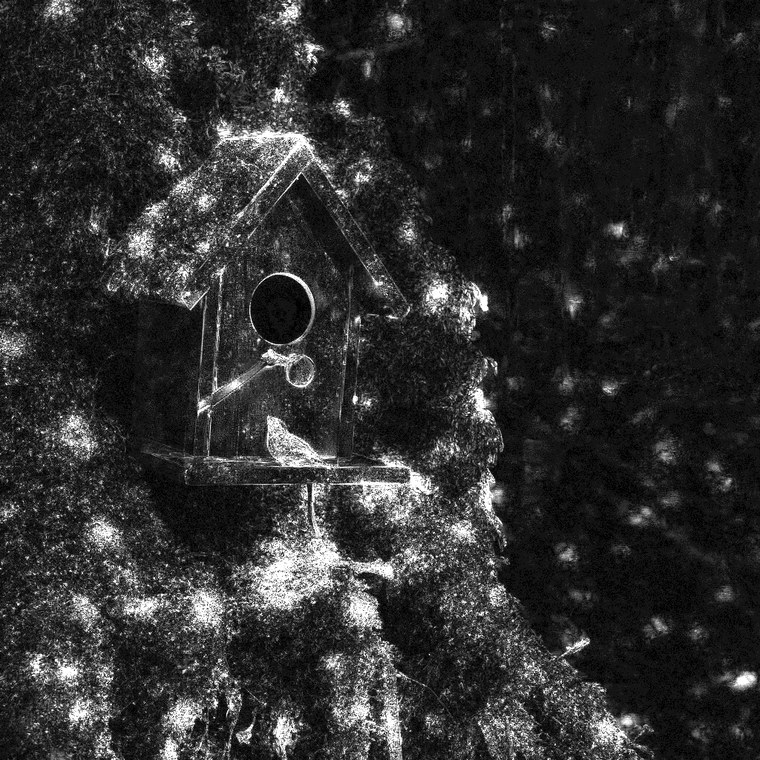
On a machine with a different CPU brand, the render differs by a hair you can't see — and it's the same hair every time. why

The original render
original
The render restored on a machine with a different CPU brand
restored
The difference map, amplified, shows a faint outline
difference, amplified

Questions

When is a move actually finished?

When is a move actually finished?

Not when the files are back — when the app works. A restore checks every file against its checksum, then starts ComfyUI, runs your workflow once and reports what passed, naming any custom node that failed to load because a system library is missing. Our own results, failures included, are on the Proof page.

When is a move finished

Watch it happen on a machine you chose.

Claim a starter nest — a run we packed and checked — restore it on a machine you rent, and read the result yourself. Free, no card.